
Bookings
Requests come to you. The confirming stays with you.
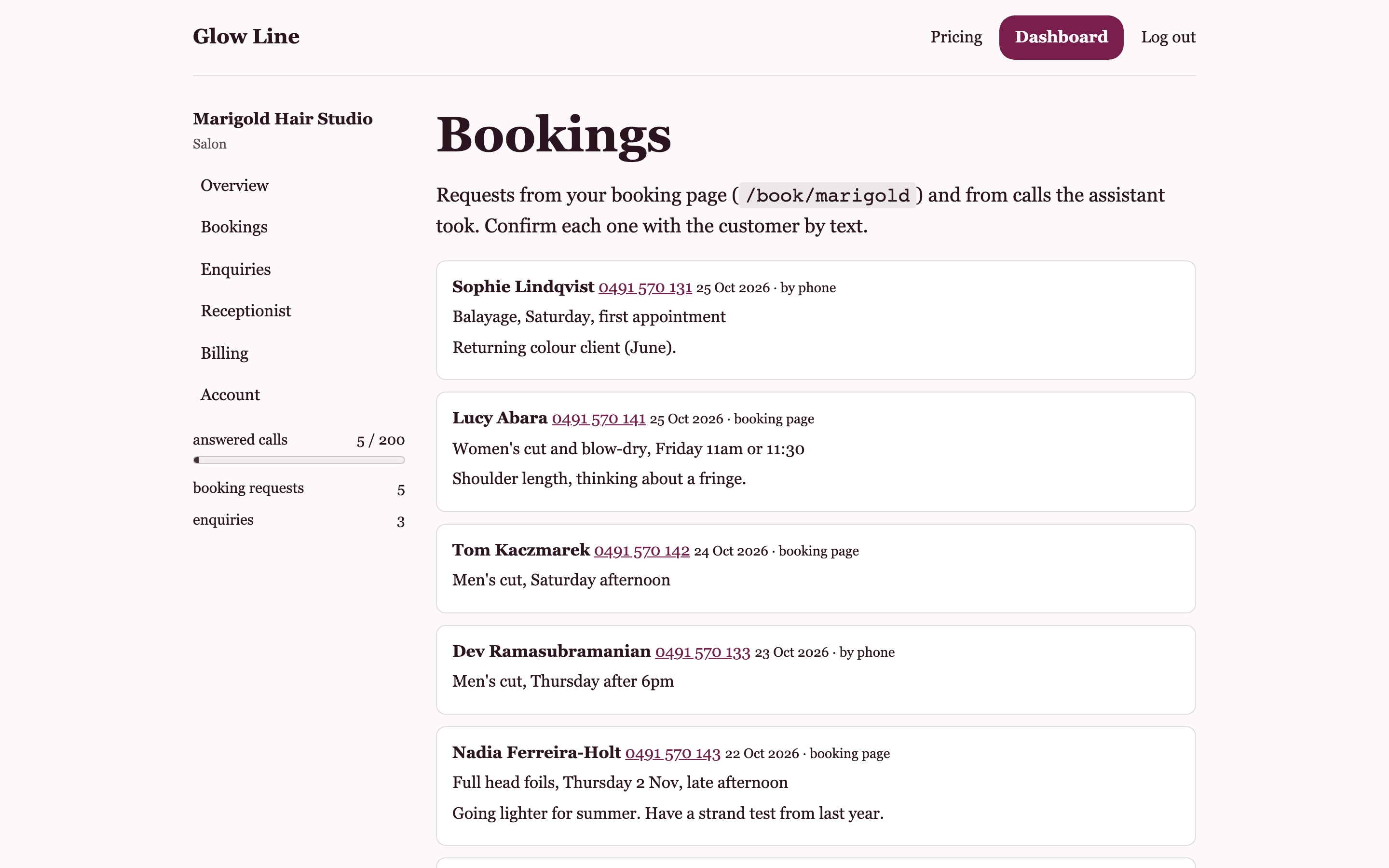
Glow Line does not write in your diary. When the assistant takes a booking on a call, or a client fills in your booking page, a request appears on your Bookings page with the person's name, mobile, the service and when they prefer. You check the book and confirm by text. The caller was told to expect exactly that.
What a request holds
The caller's name, the mobile they gave (or the number they rang from, if they gave none), the service as they named it, the day and time they prefer in their own words, and any note. The source is marked: by phone or booking page. Requests are listed newest first.
- Name, mobile, service, preferred time, note
- Marked by phone or booking page
- Mobile shown as a link that opens a text to them
Confirming
Tap the mobile number and your phone opens a text to the client. Write the time you can offer and send it. Glow Line does not send the confirmation for you and does not hold a diary, so there is no risk of it promising a chair you do not have. The caller heard the assistant say the team will confirm by text, so your message is what they are waiting for.
Requests from calls do not count against bookings
On the paid plans, booking requests are unlimited. A request the assistant takes on a call is counted as an answered call, not as a booking request. Requests from your booking page count against the monthly bookings allowance, which is 10 on Free and unlimited on Line and Salon.
Recent calls underneath
Below the requests, the Bookings page lists your recent calls: the number that rang, when, and a one-line summary of what was said. A call past your month's allowance carries a mark so you can see where you stand.
Questions about bookings
Can Glow Line confirm bookings for me?
No. It takes the request and tells the caller the team will confirm by text. You send that text yourself from the link on the request. Nothing is promised to a client that you have not checked.
Does it connect to my booking software?
No. There is no diary connection. Requests live on your Bookings page and in the text you receive after each call; you put the appointment in your own book.
What if a caller does not leave a mobile?
The request keeps the number they rang from, so you can still text or call them back. On the booking page a mobile is required.
Related
Goes with
Booking page
A public page at your own link where clients request a time. On every plan, including Free.
Read moreCall summaries
A text to your mobile after every answered call: the booking request, or a short summary of the message.
Read moreThe answered line
An Australian number that picks up your missed calls and answers from your own services, prices and hours.
Read moreGive the phone to someone who only says what you told them
Set up your services and hours, share the booking page, and add the line when you are ready. Free to start, no card.